For early childhood services in Victoria
Every change to the law, traced to your policies.
When the Regulations change or the Department sends a notice, Regwise shows which paragraphs of your own policies are affected and what each one needs. Then it keeps track of what follows: notice to families, staff sign-off and the note for your Quality Improvement Plan.
A notice arrives. Then what?
Which of your policies does it touch?
Forty or fifty policies, each citing a dozen regulations. Finding the paragraphs that rely on the words that changed takes days of reading, or a consultant.
Who has been told, and by when?
Families need 14 days' notice of some changes (reg 172). Staff need to read the new wording and sign. Someone has to hold those dates.
What do you show an authorised officer?
That the policy was updated, why each decision was made, who signed, when it went to a staff meeting, and where it sits in your Quality Improvement Plan.
How it works
From the clause to the paragraph
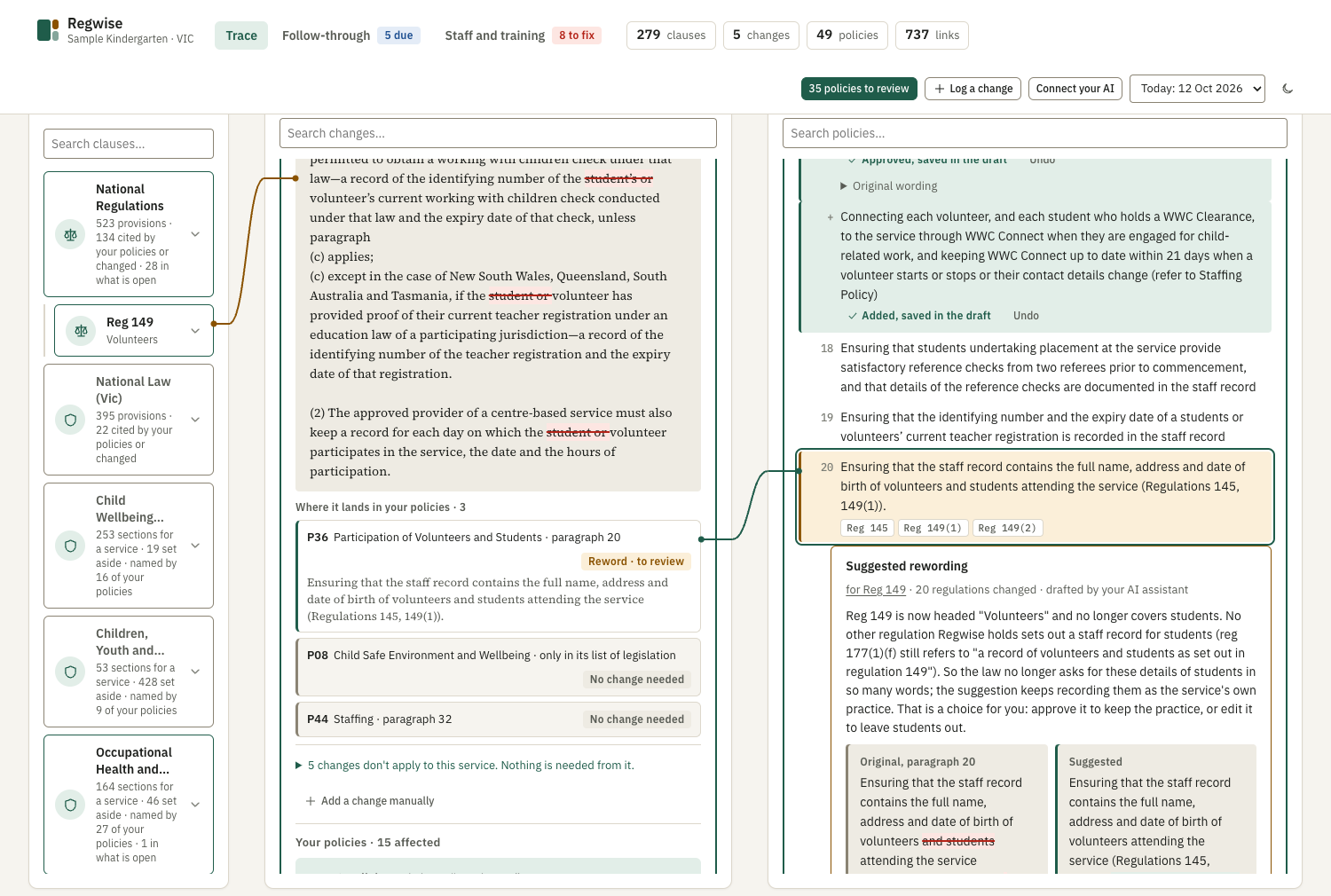
- The lawRegulation 149 changesRegwise holds the law clause by clause and compares each new version with the last.
- What changedThe words, markedRemoved words are struck through and new ones underlined, against the full text.
- Your policyParagraph 20 of one policyThe paragraphs that cite the regulation are found exactly, with a suggested rewording to approve.
Matched by clause, not by topic
Your policies already say which regulations they rely on. Regwise reads those citations paragraph by paragraph, so when reg 168(2)(ha) changes it finds the paragraphs that cite it, not every policy filed under "child safety".
- Policies read from your own Word or PDF documents
- Changes that don't apply to a centre-based service are set aside, with the reason
- A paragraph that only lists legislation isn't mistaken for where the policy deals with it
Notices, not only legislation
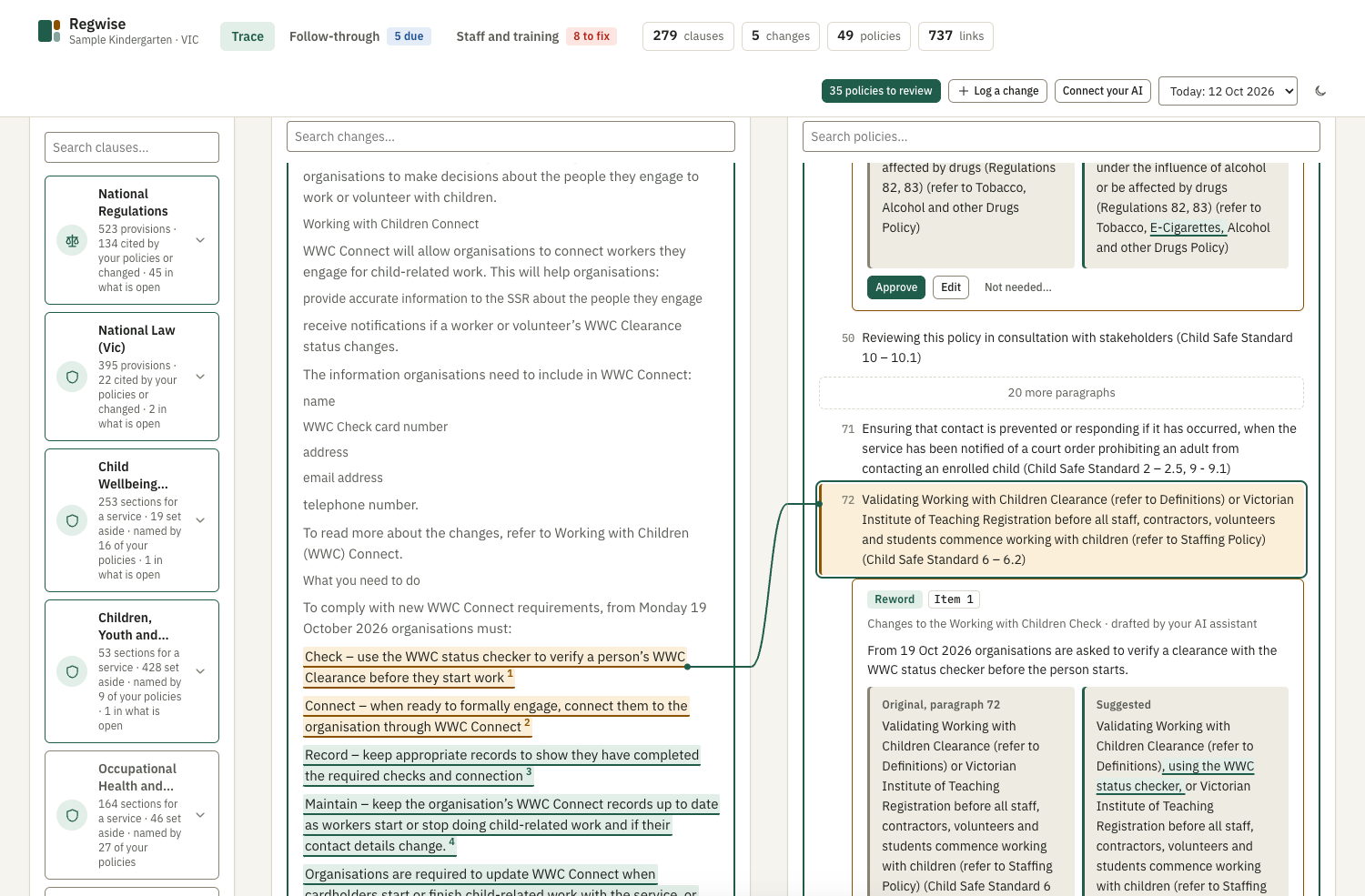
Much of what a service must act on never appears as a change to an Act: an Early Childhood Update, a regulator's notice. Give the link or the email to your AI assistant.
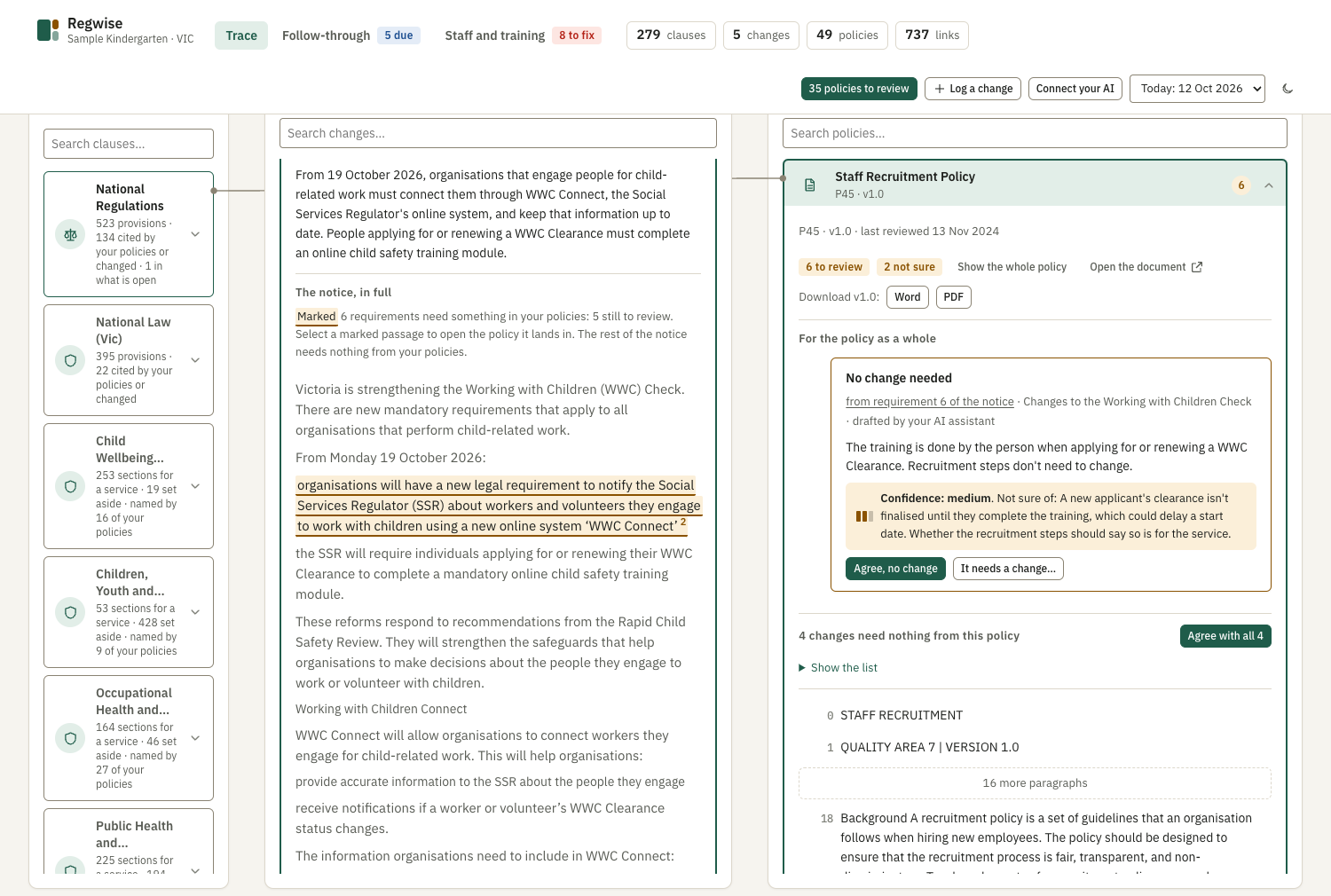
Regwise shows the notice as published, marks the passages that ask something of you, and joins each one to the policy it belongs in. The rest of the notice is greyed: it needs nothing from your policies.
Your AI assistant drafts. You decide.
The assistant you already use writes the suggested wording beside the original and says how sure it is, and of what it isn't sure.
You approve, edit or turn down each suggestion. Nothing reaches a policy until a person approves it on the page, and an approval can be undone until the policy is published.
See every feature, screen by screen Or try it on a sample kindergarten
After the policy
Updating the document is half the job
The other half is what an authorised officer asks about. Regwise knows which clause changed and which paragraph was reworded, so it can say what staff must know and do, and by when.
Follow-through
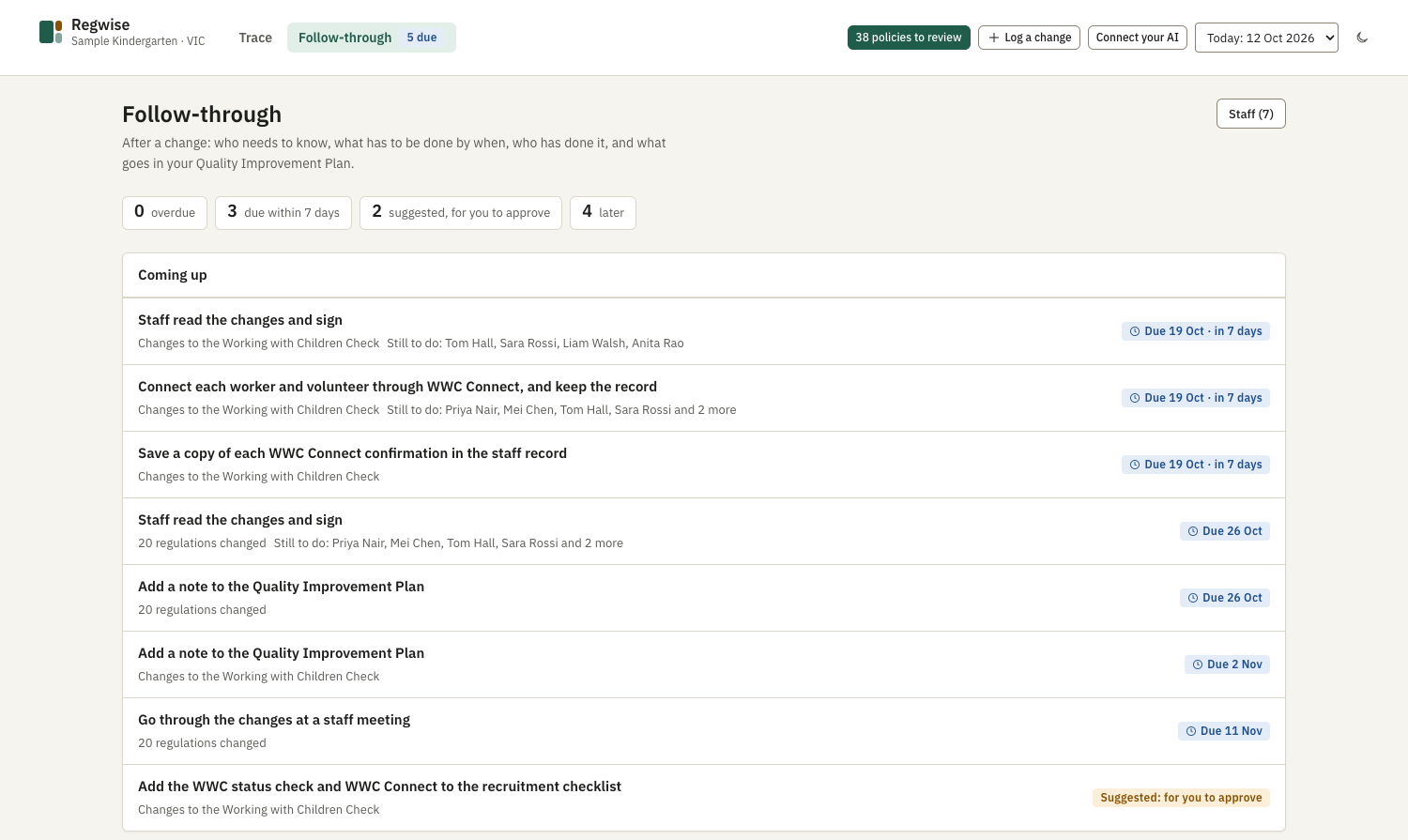
One list of what is coming up, by due date, with who is still to do it.
- Notice to families. Where reg 172 applies, Regwise works out the last day to send it and holds the policy back until the 14 days have passed.
- Staff read and sign. A printable sheet with what changed, the approved wording, likely questions and a sign-off table.
- Staff meeting. The date it was covered and where the minutes are kept.
- Quality Improvement Plan. A dated note built from what was done, under the NQS elements it belongs to, ready to copy in.
Staff and training
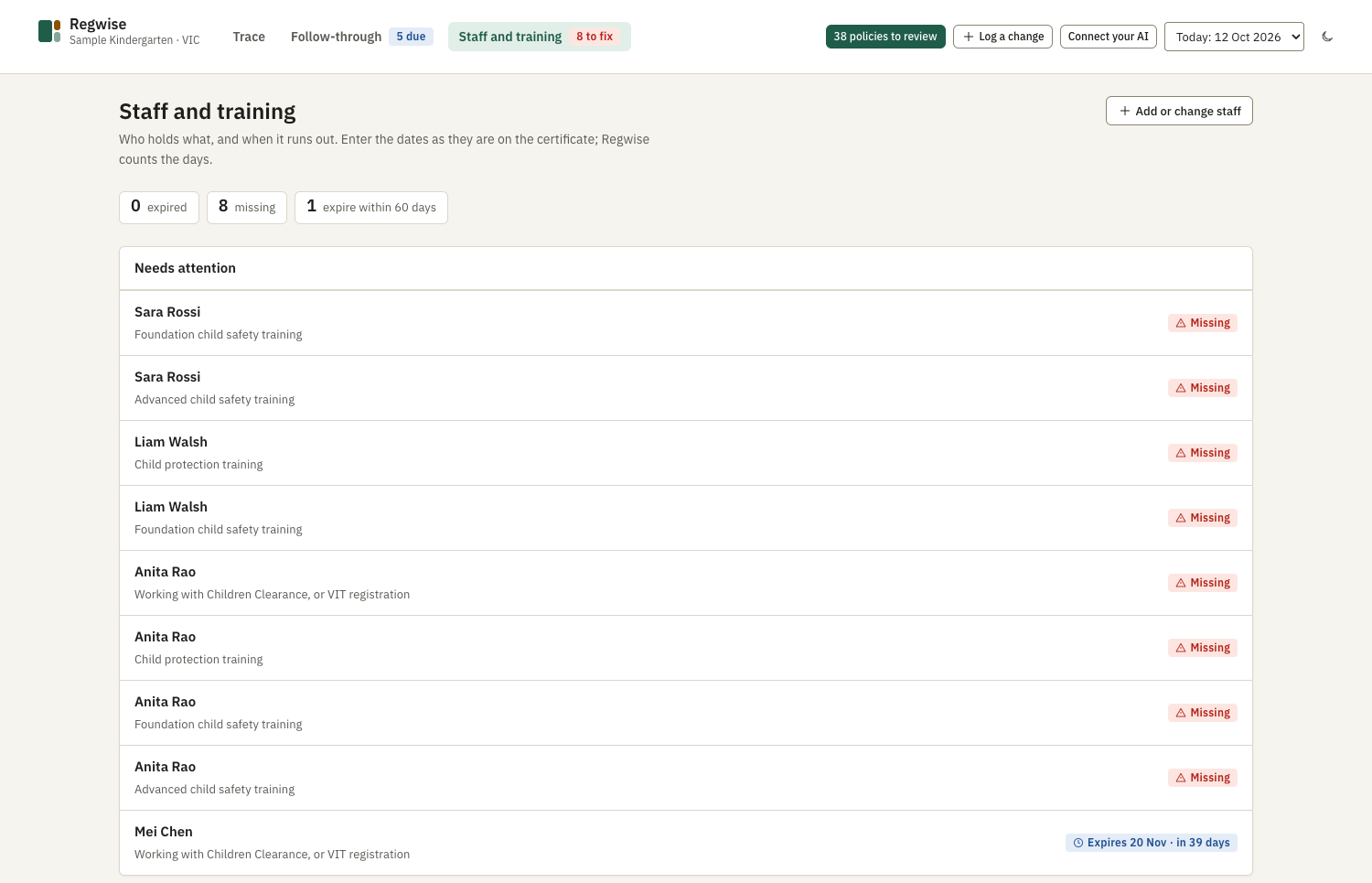
Who holds what, and when it runs out: Working with Children Clearance or teacher registration, child protection and child safety training, first aid, anaphylaxis and asthma.
Dates are entered as they are on the certificate, and the certificate can be attached to the person's staff record. The page lists what has expired, what is missing and what expires within 60 days.
One minute
The short version
The law it holds
Held in full, provision by provision
The legislation comes with Regwise, so there is nothing to find or prepare. Figures are as at October 2026.
National
- Education and Care Services National Regulations523 regulations
- Education and Care Services National Law395 sections
Checked each day for a new version. When one appears, the changes are worked out and matched to your policies.
Victorian Acts
- Child Wellbeing and Safety Act 2005
- Worker Screening Act 2020
- Occupational Health and Safety Act 2004
- Public Health and Wellbeing Act 2008
- Children, Youth and Families Act 2005
1,573 sections across the five Acts. Parts that give a centre-based service nothing to do are set aside, and you can bring any of them back.
How it runs
On your own computer, with the AI assistant you already use
Installed at your service
Regwise isn't a website you log in to. It runs on a computer at your service, and its database, your policies and your staff records stay on that computer.
Your assistant, your plan
The reading and drafting is done by an AI assistant on your own subscription, through a connector. Regwise isn't tied to one. It needs an assistant that can run commands on the computer and use connectors (MCP).
What the assistant can't do
It can't approve, turn down or publish anything. It never sees staff addresses, dates of birth, contact details, identifying numbers or certificate files.
Regwise isn't legal advice. It shows you the clause, the words that changed and the paragraph they reach. The decision is yours, and every decision is kept with its reason.
Questions
What directors ask first
We buy our policies as templates, and the supplier updates them. Why would we need this?
The template changes, but your service's version is the one that counts: you still have to bring the change into the wording you've adapted, tell families, have staff read and sign, and record it in your Quality Improvement Plan. That second half is what Regwise keeps track of.
We already use childcare management software. Does this replace it?
No. Enrolments, rosters, billing and family communication stay where they are. Regwise does one thing those systems don't: it connects a change in the law to the paragraph of your policy that relies on it.
What do we need to run it?
A computer at the service, Docker Desktop (free for a small business, and the only thing to install), an AI assistant that can run commands and use connectors, and your policies as Word or PDF documents. The assistant installs Regwise by following the guide that comes with it. It runs on macOS today; Windows is being tested.
Does our information leave the computer?
Regwise and its database stay on your computer. Your AI assistant reads your policies to do its work, under your own plan with its provider. It is never given staff personal details or certificate files.
Does the assistant have to read every policy? What does that cost?
No. Setup links every paragraph that cites a regulation without using the assistant at all, and the daily check of the law uses none either. Having the assistant read every policy to find links that aren't cited is optional, and Regwise works out the likely cost from your own documents and tells you before anything is read.
Is it for family day care?
No. Regwise is built for centre-based services: kindergartens and long day care. Regulations that bind only family day care are set aside.
Can we get our policies back out?
Yes. Each version downloads as Word or PDF, with a last page listing what changed in that version, the clause behind each change and the reason. Earlier versions are kept, and nothing is overwritten.

See where the recent changes land in your policies
Send us your current policies, or a few of them. We'll show you which paragraphs the 2025–26 child safety changes and the October 2026 Working with Children changes reach, and what each one needs. There's no cost and nothing to install.
Based in Melbourne's east. We can come to you.